
Pro subscription
Compose a multichannel PEMF protocol
Use the v3 model, three independent tracks, table, inspector and timeline.
Last updated: 10 October 2026
Objective
The PEMF/FSM editor composes a native v3 program with up to six channels arranged as three independent tracks: pairs 1–2, 3–4 and 5–6.
Permissions matrix
| Account | Editor access |
|---|---|
| Pro without practitioner declaration | No. |
| Effective Pro practitioner | Yes, for their PEMF protocols and custom frequencies. |
| Administrator | Yes, including reserved technical tools. |
Pair 1–2 remains enabled. The other pairs can be enabled when needed; every track starts at zero and advances in parallel. Total duration is the longest enabled track, while completed tracks remain silent.
Requirements
- Have effective practitioner status or an administrator account.
- Use a recent browser with audio permission for preview.
- Keep volume moderate during the first test.
Steps
- Open Dashboard > PEMF editor and name the protocol.
- Create segments on pair 1–2, then enable 3–4 or 5–6 when several tracks should play in parallel.
- Unlock one pair at a time and select its segments in the table or timeline.
- Edit duration, hertz values and meanings directly; use the inspector for gains and detailed ramp settings.
- Choose the shared waveform for the segment. Square forces alternate polarity; ramped square supports alternate, positive or negative polarity.
- Populate both sides of an additional pair or explicitly use 0 Hz for a silent side.
- Copy non-contiguous segments, activate the target pair and paste them at the selected point.
- Use Factorize to spread the 1–2 sequence across tracks, Distribute to 1–2 to bring them back, or Merge to collapse strictly identical adjacent duplicates.
- Review the three overlaid tracks with zoom, pan, playback, volume and pulse settings.
- Fix the first validation message before saving or exporting.
Tip
Regular native JSON exports preserve a portable copy of the v3 program and all its settings.
Caution
FSM frequencies and labels are documentary references; they are not diagnoses, prescriptions or proof of therapeutic effect.
Images
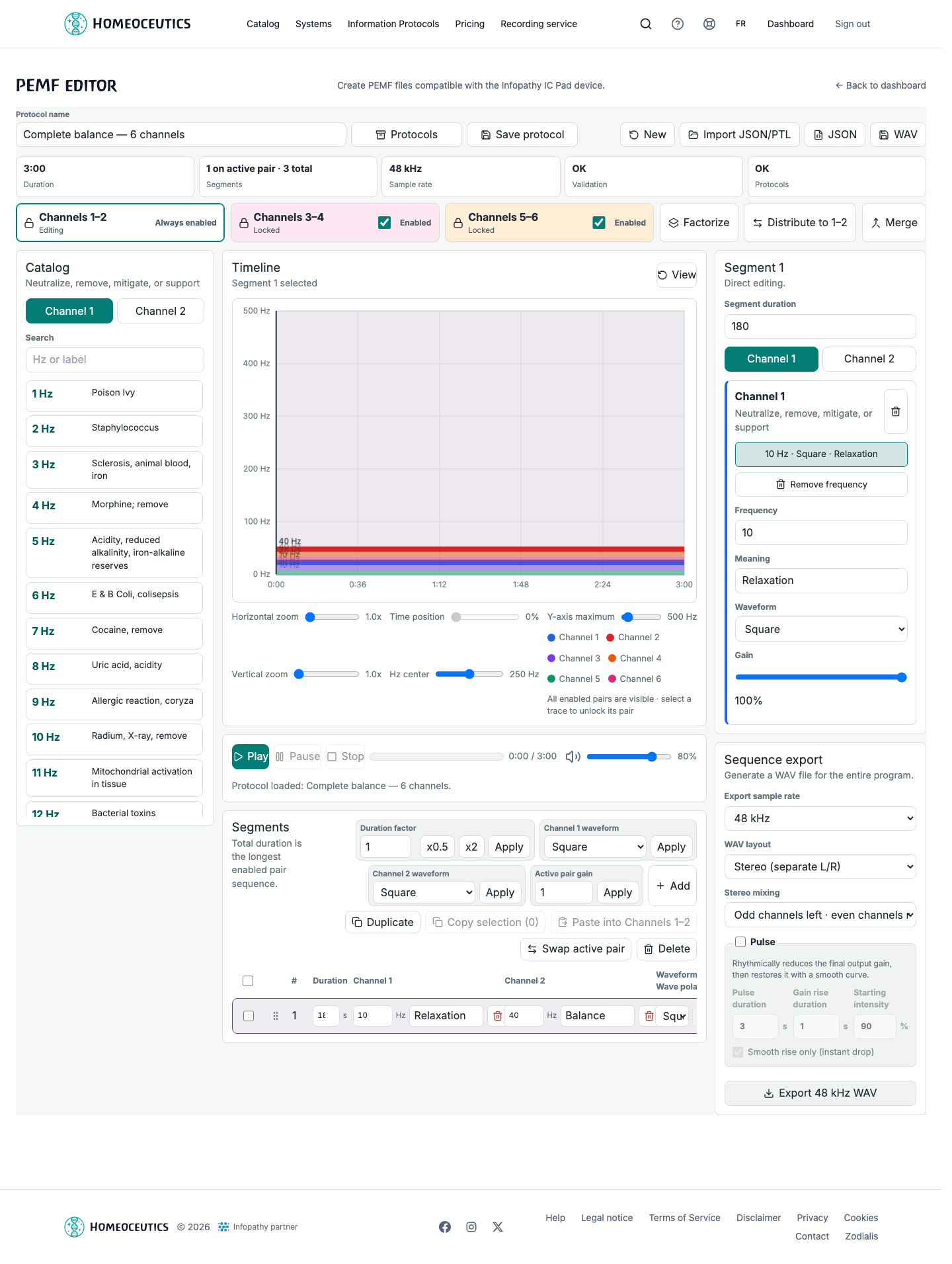
PEMF editor — six channels
- URL
- /help/en/editeur-cemp-multicanal.png
- Alternative text
- PEMF editor showing three pairs, six channels, the table and the timeline.
- Note
- Shows a fictional program with pairs 1–2, 3–4 and 5–6 enabled.
Common issues
- If an additional pair is invalid, complete both channels, explicitly use 0 Hz on the silent side or disable the pair.
- If Factorize is rejected, save and then clear frequencies already present on 3–4 or 5–6.
- If Merge finds nothing, check that adjacent segments have identical frequencies, gains, polarities, waveforms and ramps.
- If no sound is audible, check hertz values, gains, volumes and browser audio permission.
- An older v1 or v2 JSON file is normalized to v3; legacy multiple slots remain editable or removable without allowing new ones to be added.