
Pro subscription
PEMF library, sharing and exports
Organize protocols, import several files, share a copy, advise and choose an export format.
Last updated: 10 October 2026
Objective
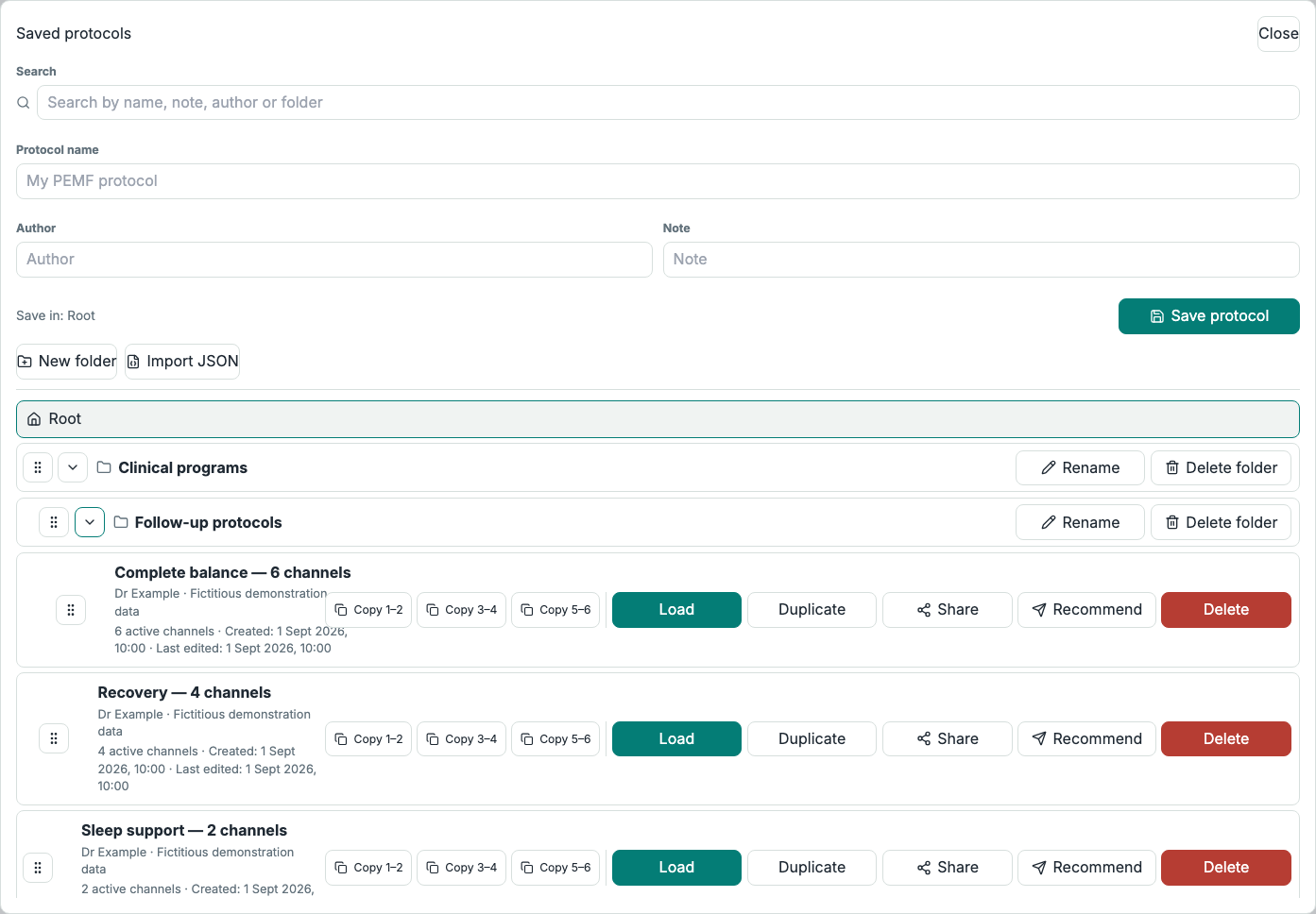
The PEMF library stores account protocols in a folder tree. It separates editable working copies from immutable advised snapshots intended for fsm.care.
Actions matrix
| Action | Recipient or format | Result |
|---|---|---|
| Save, duplicate or import | Practitioner library | Editable, classifiable and reusable protocol. |
| Share | Active Pro subscriber | Independent editable PEMF copy. |
| Advise | Self or eligible connected patient | Immutable snapshot; fsm.care synchronization while the advised program remains active. |
| JSON or WAV | Standalone file | Archive/reimport or rendered audio. |
| Infopathy interoperability | Administrator | HTML import and CSV, Excel, PTL or FTMMX exports reserved for technical tools. |
Requirements
- Have access to the PEMF editor.
- To share a copy, choose an active Pro recipient.
- To advise a patient, have an available connection; self-advice needs no connection.
- Keep enough local disk space before rendering a long WAV program.
Steps
- Create folders and subfolders, use search and drag protocols into the tree.
- Save and reopen the current program with name, note and author; duplicate it before a significant change or delete it when it is no longer useful.
- Import one or more native JSON files into the library. Supported earlier versions are normalized to the current model; a PTL file can also be imported individually into the editor.
- From a saved protocol, copy a pair and paste it into the active pair of the current program.
- Use Share to deliver an editable copy to an active Pro subscriber.
- Use Advise for yourself or a connected patient, with an optional message, inclusive expiry and frequency masking.
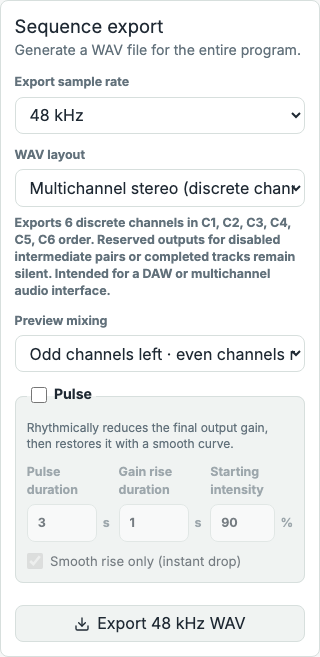
- Export JSON for a portable archive or a 44.1 or 48 kHz WAV as separated stereo, merged mono duplicated to both sides, or 2, 4 or 6 discrete channels in C1-to-C6 order.
- For discrete multichannel output, use a workstation or interface that can route every output; the displayed mixing strategy affects stereo preview only.
- An administrator can use Infopathy interoperability formats. FTMMX remains limited to pair 1–2 and supported waveforms.
- A practitioner advises an FSMPro protocol directly from the catalog: only an administrator can open it in the editor for technical purposes. Suspended FSMPro access no longer unlocks the full catalog.
- Manage delivered advice and copies from Dashboard > Advice > Advice given.
Tip
Duplicating before a transformation and retaining a JSON export makes it easier to return to an earlier version.
Caution
Revoking the original copy or advice cannot recall a duplicate or file already exported by the recipient.
Images
PEMF library and folders
- URL
- /help/en/bibliotheque-cemp.png
- Alternative text
- PEMF library with fictional protocols, nested folders and separate Share and Advise actions.
- Note
- Uses fictional protocols and keeps Share and Advise visibly separate.
Multichannel PEMF export settings
- URL
- /help/en/export-cemp.png
- Alternative text
- PEMF editor showing multichannel WAV formats and export settings.
- Note
- The displayed protocol and all interface data are fictional.
Common issues
- If JSON import fails, check that it is a supported native program and fix the first displayed message.
- If Share offers no recipient, verify that the target account has an active Pro subscription.
- If Advise offers no patient, check the connection and patient subscription, or choose self-advice.
- If a multichannel WAV appears to be stereo, open it in a workstation that can display and route all channels.
- If an Infopathy tool is missing, it is administrator-only; use JSON or WAV for the standard practitioner workflow.