
Homeoceutics: What's the best homeopathy Software ?
Discover Homeoceutics: repertorization, astrological similimum analysis, informational preparation with Infopathy and FSM/PEMF sequences with format compatibility for iCare, Magrez and Infopathy. Compare its features with seven homeopathy software solutions and explore Basic, Premium and Pro.
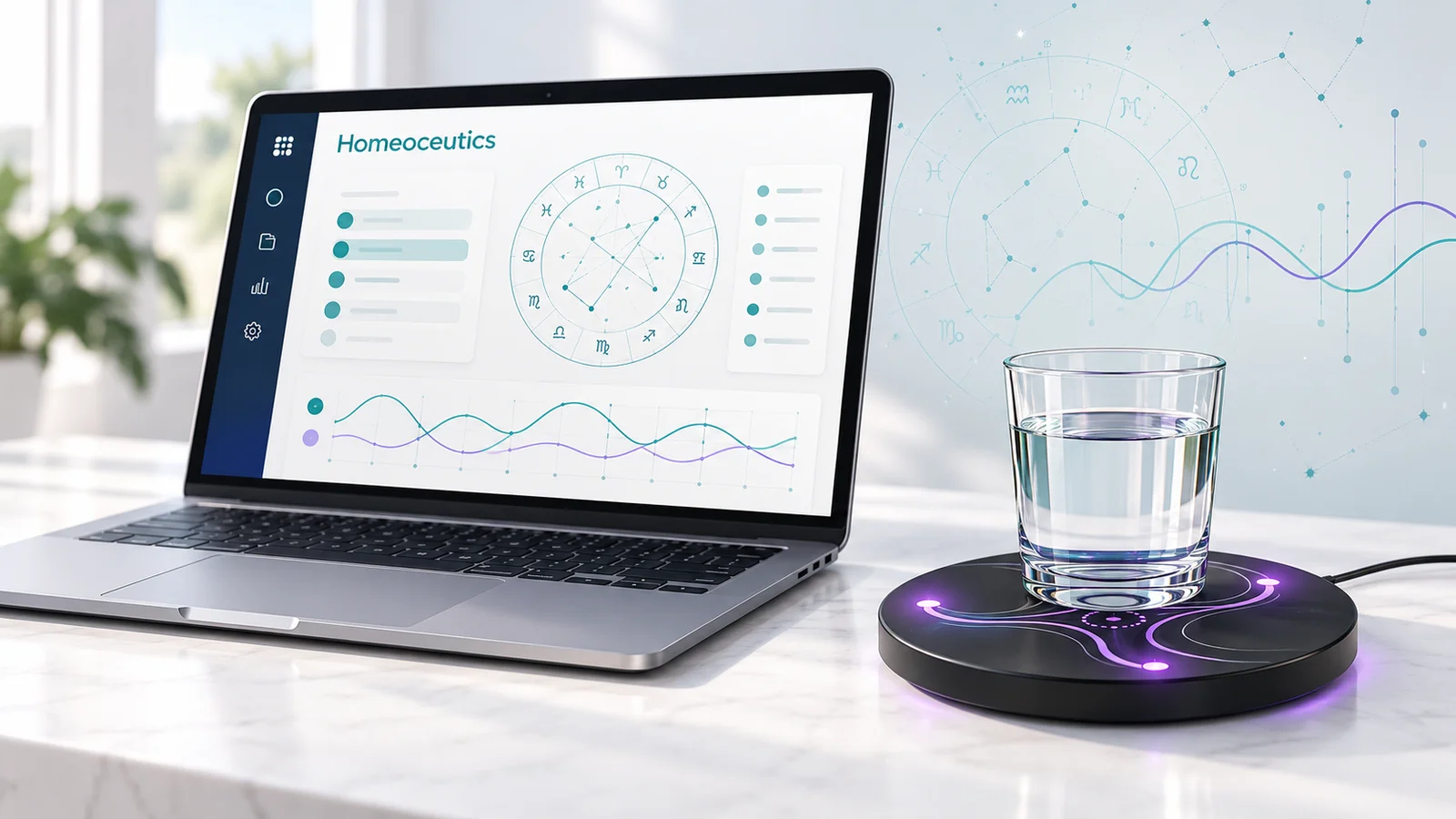
Homeoceutics combines repertorization, materia medica, astrological similimum analysis and the preparation of informational media inspired by homeopathy through its partnership with Infopathy. A separate, complementary FSM/PEMF offering adds frequency sequences and an editor with compatibility features for different device formats.
Choosing homeopathy software starts with a practical question: what do you want to do? You might be exploring books, finding repertory rubrics, comparing remedy descriptions, recording observations or designing informational protocols. Different applications address these tasks in different ways.
This comparison begins with Homeoceutics, followed by Homeo&Care, Homeoco, Similia, Complete Dynamics, Vithoulkas Compass, RadarOpus and LOGHOMEO. Published by Homeoceutics, it draws on publicly available product information reviewed on October 26, 2026. It compares documented features rather than reporting an exhaustive hands-on test of every application.
Homeoceutics: connecting homeopathic research and informational resources
A catalogue connected to explanatory information
The Homeoceutics catalogue brings together infoceutics, complexes and supporting information. Homeopathy is a major focus, alongside approaches such as gemmotherapy. Connections between reference pages, body systems and protocols let you explore an entry through several related topics.
For an individual reader, this structure provides useful starting points. For a student, it makes relationships between concepts easier to explore. For a practitioner, it connects reference research with resources they want to organize. Access to particular content depends on the subscription plan and account status.
A repertorization tool for practitioners
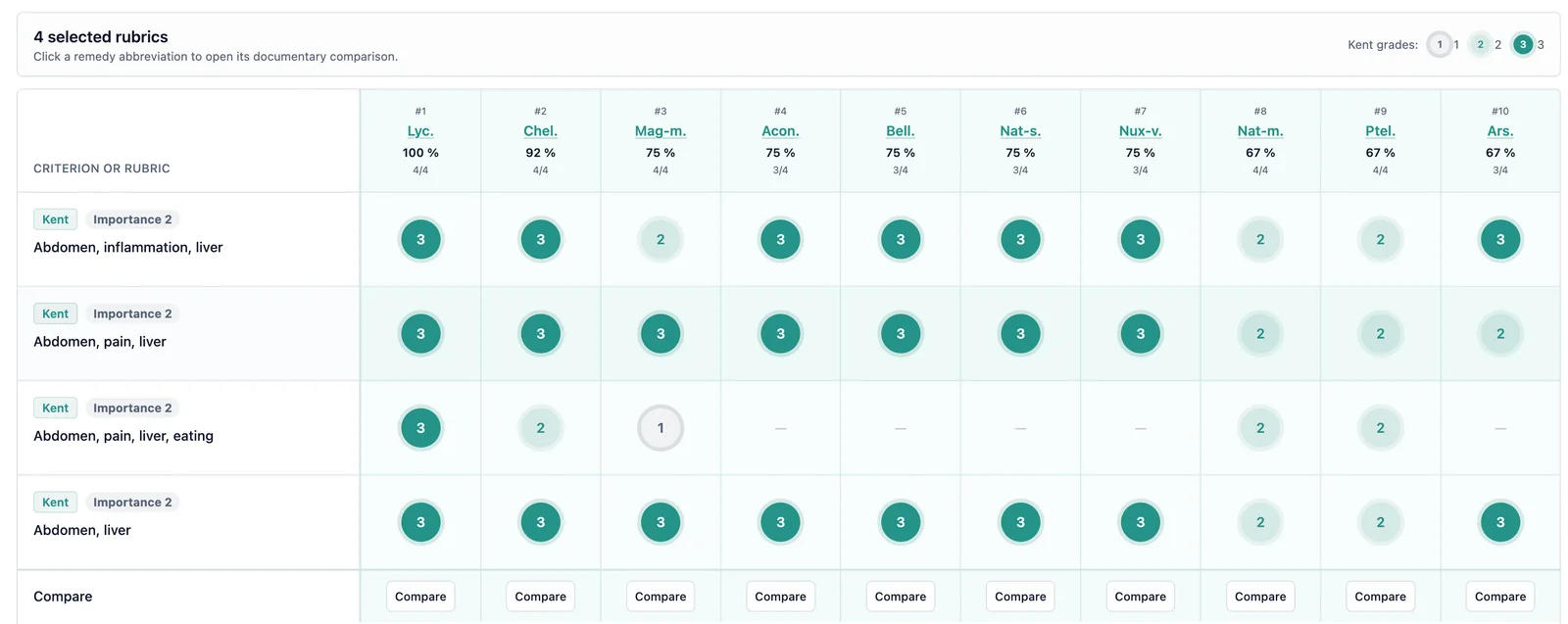
The Pro plan includes a source-based infoceutic repertorizer. Practitioners search Kent rubrics, confirm the rubrics they want to retain, assign importance and review the resulting ranking. They can then compare candidates against the available passages in materia medica.
This workflow makes the documentary reasoning available for review: selected rubrics, coverage and references. The ranking supports exploration of the texts; it does not express a probability of recovery. The practitioner manually selects the remedy reference and, where applicable, the associated infoceutic.
Materia medica and assistance with exploration
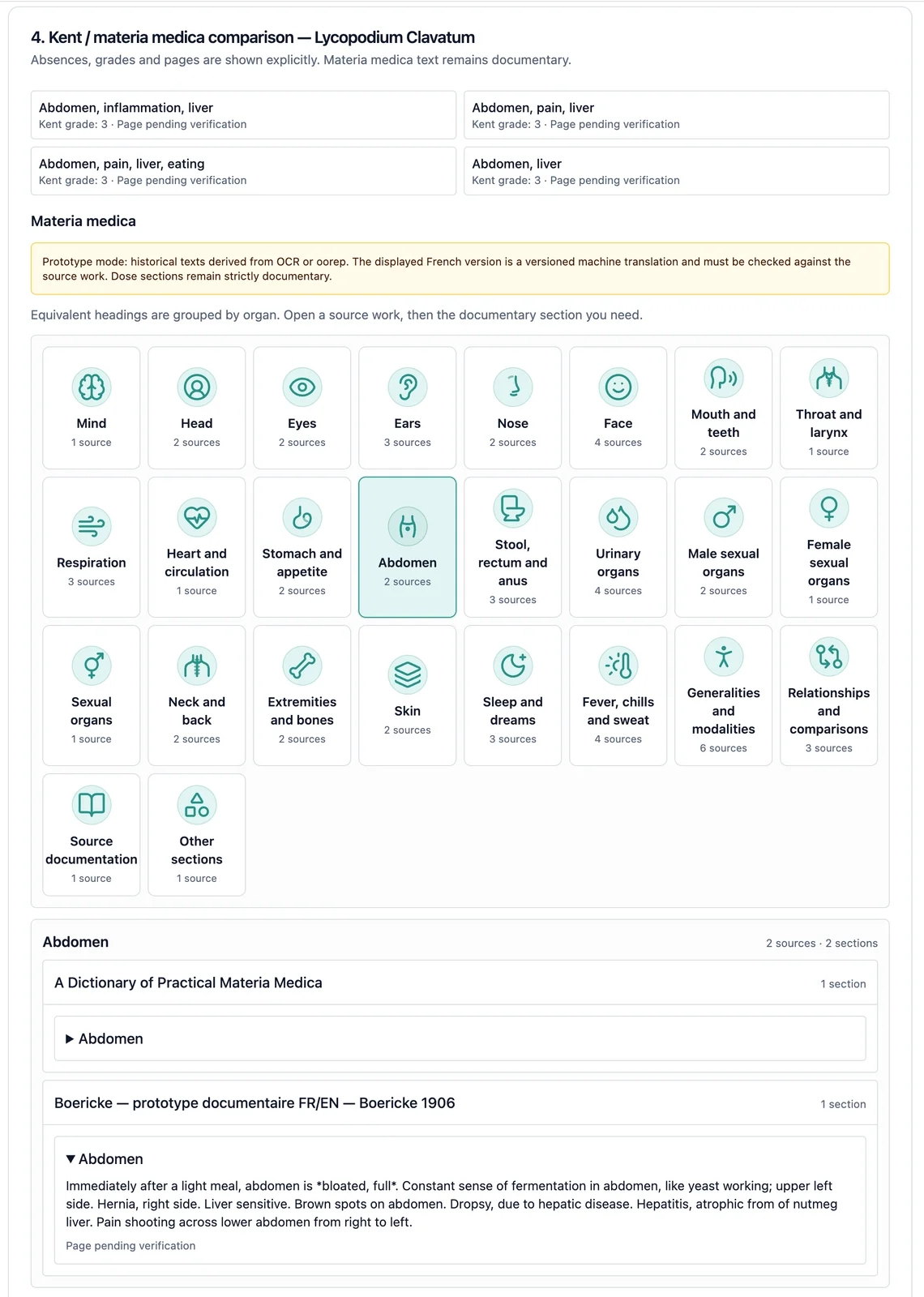
A materia medica describes the characteristics traditionally associated with remedies. Reading it complements repertorization: it places a result within a fuller description and allows you to examine the available passages. In Homeoceutics, this reading forms part of the candidate comparison process.
The AI assistant, included in Premium and Pro within their respective scope, provides another way to explore content and ask questions. The conversational assistant and the repertorizer perform different roles. Checking references remains essential, especially when a response summarizes a complex subject or presents a passage without its full context.
Astrological similimum analysis
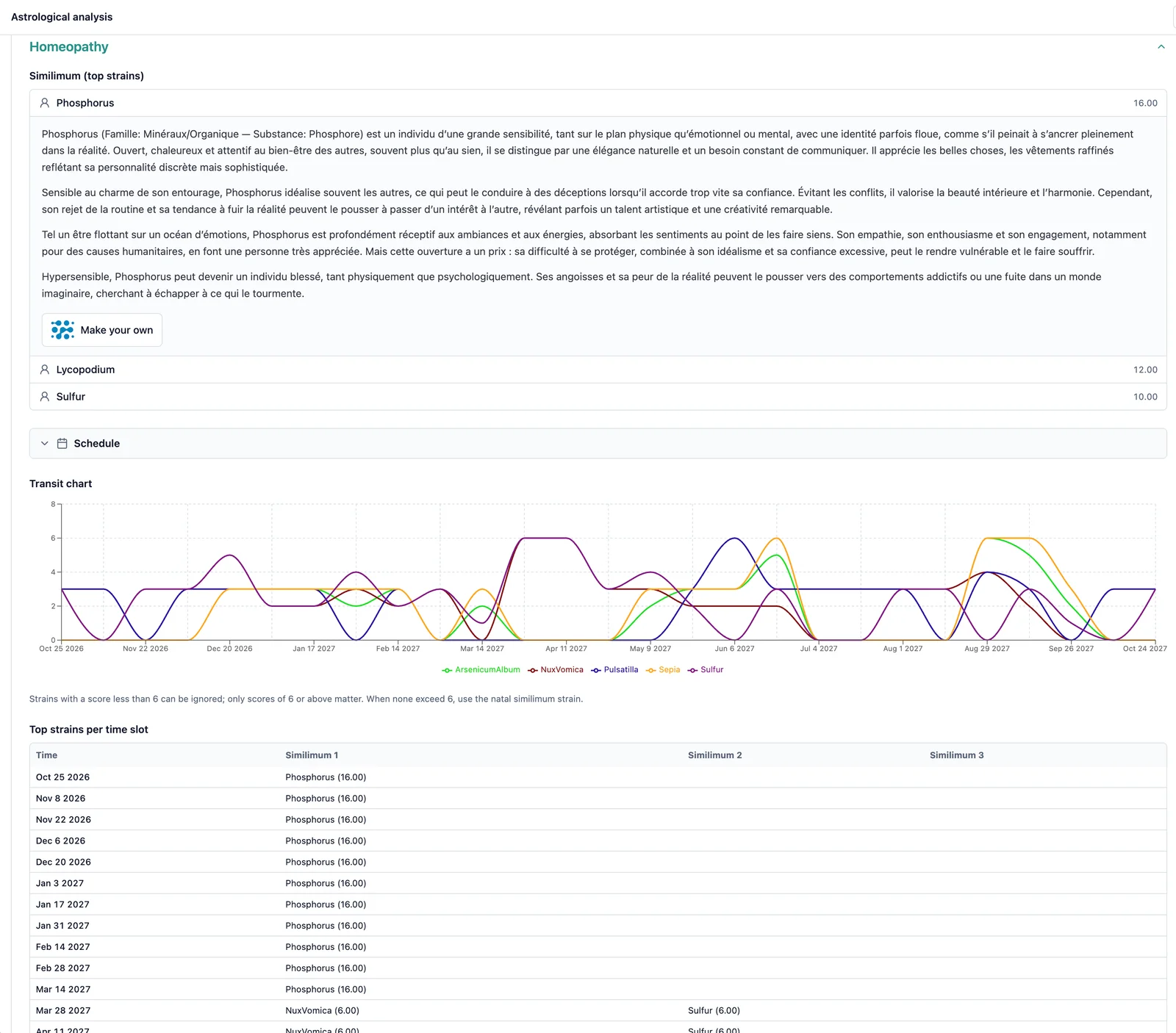
The Pro plan also includes astrological similimum analysis. Using the date, time and place of birth, this reading connects the natal chart with homeopathic remedy portraits and suggests candidates for further exploration. It adds a symbolic approach to the research tools; these correspondences are neither a diagnosis nor evidence of therapeutic effectiveness.
Patient records to organize your work
Eligible practitioners can organize consultations, observations and follow-up information in patient records. The calendar notebook and recommendations sent to patients extend this workspace. The practical benefit is continuity between the references you study and the work you document in your account.
FSM/PEMF sequences: a distinct, complementary function
Homeoceutics also provides FSM/PEMF sequences. This frequency-program offering is distinct from and complementary to its homeopathic resources, with sequences to explore and organize for their intended use.
The multichannel PEMF/FSM editor lets you compose, visualize and save your own sequences, then export them in supported formats.
Compatibility features cover environments including PerfectWaves, iCare, Magrez and Infopathy. Subject to access rights, supported exchanges include Perfect Waves PTL, Magrez CSV and Infopathy CSV/XLSX exports. Each format has its own limits for channels, timing and signal settings.
Preparing your own informational media with Infopathy
Through the partnership with Infopathy, you can prepare your own informational media from homeopathic references in the catalogue. Select an infoceutic on Homeoceutics, open its signal on Infopathy and run an imprinting program with water on a compatible Glowing IC Pad, following the method proposed by Infopathy.
This informational preparation does not reproduce the manufacture of a homeopathic medicine and is not equivalent to one. Infopathy access and compatible equipment are required; combined plans include the subscription, while equipment is purchased separately.
Accessing your practitioner’s protocols through fsm.care
Through fsm.care, patients with the required access can receive FSM/PEMF protocols sent by their certified practitioner directly on their mobile device .Once activated and synchronized, the application can play stored protocols offline while authorization remains valid (works in plane mode). Periodic reconnection renews access and retrieves updates, making synchronization an important part of the workflow.
Homeopathy software comparison: eight approaches
The table summarizes documented functions, which can vary by edition and access rights. A feature that is not listed should not be treated as unavailable. Device information reflects the public descriptions reviewed; readers should check the specific version they intend to use.
Solution | Audience | Main features | Platforms | Particular appeal |
|---|---|---|---|---|
Homeoceutics | Individuals, students and practitioners, subject to access | Catalogue, repertorizer, materia medica, AI, astrological similimum analysis, records and FSM/PEMF sequences | Web; PerfectWaves, iCare, Magrez and Infopathy formats; fsm.care | References, informational preparation and complementary frequency programs |
Homeo&Care | Practitioners | Symptom searches, indications and common protocols | Web | Guided prescribing-support workflow |
Homeoco | General readers | Hugo assistant and educational exploration | Web | Understanding homeopathic descriptions |
Similia | Students and practitioners | Repertories, materia medica, semantic search, AI and records | Web, synchronization across devices | Research across multiple reference collections |
Complete Dynamics | Students and practitioners | Complete Repertory, analysis and edition-specific tools | Windows, Mac, Linux, iOS and Android | Installed software for offline work |
Vithoulkas Compass | Students and practitioners | Repertory, materia medica, cases and expert system | Web | Approach associated with the Vithoulkas method |
RadarOpus | Students and professionals | Repertorization, reference library and patient records | Windows and Mac; separate OpusGO mobile offering | Professional references and tools by package |
LOGHOMEO | Healthcare professionals | Records, comparison and prescribing workflows described by FNSMHF | Current compatibility unconfirmed | Practice organization; availability needs checking |
Other homeopathy software: areas of focus
Homeo&Care: starting from symptoms
Homeo&Care presents searches based on symptoms or a condition, with criteria refinement, indications and common protocols. Its stated focus is homeopathic prescribing support. It is a relevant product to examine for practitioners interested in a guided workflow around a described situation.
Homeoco: guided learning with Hugo
Homeoco highlights Hugo, an educational assistant aimed in particular at family use. It supports reading and understanding homeopathic descriptions and their context. This approach is primarily relevant to readers seeking accessible explanations; the public presentation states that Hugo does not replace a medical diagnosis.
Similia: semantic search and multiple sources
Similia combines repertories, materia medica, semantic search and AI features. Its presentation also describes transcription, rubric mapping and case synchronization. Its appeal includes searching across multiple reference collections. Readers should check which sources and functions are included in the particular edition they are considering.
Complete Dynamics: Complete Repertory across devices
Complete Dynamics is built around Roger van Zandvoort’s Complete Repertory. Browser, Practitioner and Master editions offer different feature levels. The publisher lists desktop and mobile applications that work without Internet access, making it worth examining when locally installed, offline software is a priority.
Vithoulkas Compass: an online expert system
Vithoulkas Compass combines a repertory, materia medica and case management, with functions for individual remedy analysis and differential comparison. Its approach is associated with George Vithoulkas’s method. It is particularly relevant to users wishing to work within that methodological framework and explore the reference analysis of a case.
RadarOpus: a professional reference environment
RadarOpus combines repertorization, a homeopathic library and patient records. Packages contain different repertories, books and analysis tools. The main application runs on Windows or Mac, while the site also presents OpusGO for mobile use. The relevant comparison is the content of the package that matches your work.
LOGHOMEO: a description requiring context
The FNSMHF presentation of LOGHOMEO describes patient records, standard, custom or guided prescriptions, and reference comparison. We have not confirmed its current commercial availability or compatibility with recent operating systems. These points need verification before considering it for use.
Homeoceutics plans and pricing
The following amounts appeared on the Homeoceutics subscription page on October 26, 2026. Monthly and annual columns represent separate billing schedules. The annual amount covers twelve months and should not be confused with a monthly payment. All amounts below are in euros.
Plan | Homeoceutics only / month | Homeoceutics only / year | With Infopathy / month | With Infopathy / year |
|---|---|---|---|---|
Basic | €10 | €72 | €18 | €159 |
Premium | €24 | €192 | €30 | €279 |
Pro | €30 | €240 | €38 | €299 |
Basic covers resources within its scope, including additional homeopathy and gemmotherapy, Poconéol complexes and documentary assessment scales.
Premium adds organotherapy, homoserums, protocol programs, FSM sequences emulated as PEMF on Infopathy, and the AI assistant.
Pro extends Premium with patient records, the repertorizer, materia medica, the FSM/PEMF editor and its format exchanges, the calendar notebook and astrological similimum analysis.
Practitioner-only functions require effective practitioner status as well as the appropriate subscription. Homeoceutics-only plans do not include an Infopathy subscription; combined plans do. Equipment is purchased separately. Subscriptions renew, and cancellation is managed through the account under the applicable subscription terms.
Which homeopathy software fits your needs?
If you want to understand the references and their vocabulary, start with readable explanations and straightforward navigation. Homeoceutics fits this approach when you also want to explore connections with infoceutics. Check the content available under the plan you are considering and whether its organization makes sense to you.
For study or repertorization work, examine the actual books included, their language and the ability to consult sources. Try searches that reflect your own work: locate a rubric, compare two candidates and retain observations. The number of documents alone does not tell you how useful a library will be.
If you want to connect reference research, astrological similimum analysis, records and FSM/PEMF sequences, Homeoceutics Pro deserves particular attention. The Infopathy partnership also lets you prepare your own informational media. If your priority is a particular editorial collection, a specific method or installed offline software, also examine the corresponding specialist solutions.
Frequently asked questions about homeopathy software
What is homeopathy software used for?
It helps users search references, compare documentary material and, depending on the product, organize records. Some applications emphasize learning, while others offer a professional workspace. The useful starting point is the set of tasks you actually need to perform, rather than the longest feature list.
What does repertorization mean?
Within homeopathic methodology, repertorization connects selected rubrics with documented remedies. Software organizes that comparison. In Homeoceutics, the practitioner confirms the rubrics and retains the final choice. A ranking is a reference result, not evidence of therapeutic effectiveness or a prediction of an individual outcome.
Why read materia medica after reviewing a ranking?
It provides a fuller description, allows a passage to be checked and helps readers examine differences between candidates. Returning to the text places results in their source context and can reveal a rushed interpretation or a translation ambiguity that a summary alone might conceal.
What role can artificial intelligence play?
Depending on the application, AI can help explore texts, rephrase questions or identify documentary leads. Responses need checking against sources. An AI feature, a repertorization tool and a diagnostic tool should not be treated as interchangeable. Read the product description to understand the task each function performs.
Which Homeoceutics plan should I choose?
Basic supports catalogue exploration within its scope. Premium expands the programs and includes the AI assistant. Pro also includes astrological similimum analysis and tools reserved for eligible practitioners. Preparing informational media additionally requires Infopathy access, included in combined plans, and compatible equipment.
Explore the Homeoceutics catalogue, visit the help centre and review the Basic, Premium and Pro plans to prepare your choice.
This informational article compares software functions. Homeoceutics makes no claim of therapeutic effects; its resources and tools do not replace medical diagnosis or prescribed treatment.