
Basic subscription
PocketFSM, fsm.care and authorized devices
Activate PocketFSM, synchronize advice and revoke devices from the Subscription page.
Last updated: 10 October 2026
Objective
PocketFSM uses fsm.care to verify Homeoceutics entitlement and synchronize the complete list of advised FSM or PEMF protocols that are still active.
Permissions matrix
| Account | PocketFSM and devices |
|---|---|
| No effective paid subscription | New activation is unavailable. |
| Effective Basic, Premium or Pro plan | Up to two active devices or browser profiles. |
| Administrator | Technical entitlement and up to seven active devices. |
The password is used for initial activation. The installation then receives its own signed secret. The Subscription page lists authorized installations and lets the user revoke them.
Requirements
- Have an effective Basic, Premium or Pro subscription, or administrator technical entitlement.
- Install PocketFSM or open the browser profile to authorize.
- Have at least one active FSM or PEMF advice item to see a synchronized protocol.
Steps
- In PocketFSM, enter Homeoceutics credentials when activation is requested.
- Give the installation a recognizable label so it can be identified in the device list.
- Let PocketFSM finish its first synchronization; the returned response is the authoritative active-advice list.
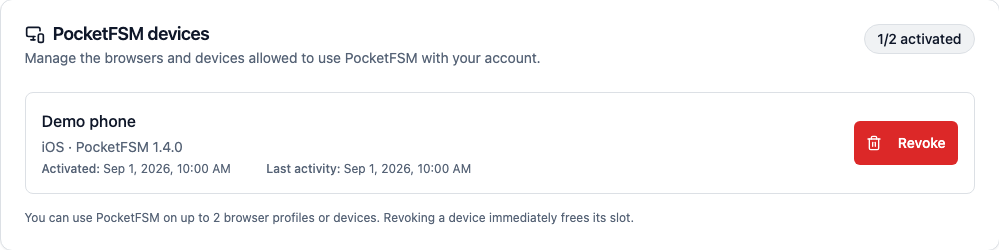
- Open Dashboard > Subscription to review each device label, platform, PocketFSM version, activation date and last activity.
- To free a slot or remove a lost device, choose Revoke and confirm. The slot is released immediately.
- Run PocketFSM synchronization again after new advice, revocation or a practitioner-patient reconnection.
Tip
Distinct labels, such as device type and purpose, make targeted revocation easier.
Caution
Revoking a device blocks future authentication and synchronization, but does not guarantee remote deletion of files already stored locally.
Images
Subscription — PocketFSM devices
- URL
- /help/en/pocketfsm-appareils.png
- Alternative text
- List of fictional PocketFSM devices with recent activity and a revoke action.
- Note
- Technical identifiers are hidden while the active-device limit remains visible.
Common issues
- If activation is rejected, check the subscription status and Homeoceutics credentials.
- If the limit is reached, revoke an unused installation from Subscription and try again.
- If advice is missing, check that it is active, the patient-practitioner connection is still available and PocketFSM has completed a new synchronization.
- An empty synchronized list is authoritative for previously synchronized advice; it does not delete protocols created or imported locally.