
Basic subscription
Connect a practitioner and a patient
Invite a patient, accept the connection and understand states, subscriptions and revocation.
Last updated: 10 October 2026
Objective
The Connections page establishes an explicit relationship between a patient account and exactly one record owned by a practitioner. The local record and the account connection are separate objects.
Permissions matrix
| Role | Condition | Action |
|---|---|---|
| Practitioner | Effective practitioner status; MFA check when required by the administrator | Invite, resend, revoke and review connections. |
| Patient | Verified account; Basic, Premium or Pro subscription to make the connection available | Accept an invitation and manage “My practitioners”. |
| Administrator | Technical practitioner access | Support under the same connection rules. |
Requirements
- To invite, have effective practitioner status and unlock the protected area when Patients MFA is enabled.
- Know the first name, last name and email address the patient will use for the account.
- The patient must have an active subscription of their own for an accepted connection to become available.
Steps
- The practitioner opens Dashboard > Connections or the invitation panel in a patient record.
- They enter first name, last name and email. Homeoceutics creates or reuses a provisional record without arbitrarily merging data.
- The invitation creates a single-use link valid for seven days.
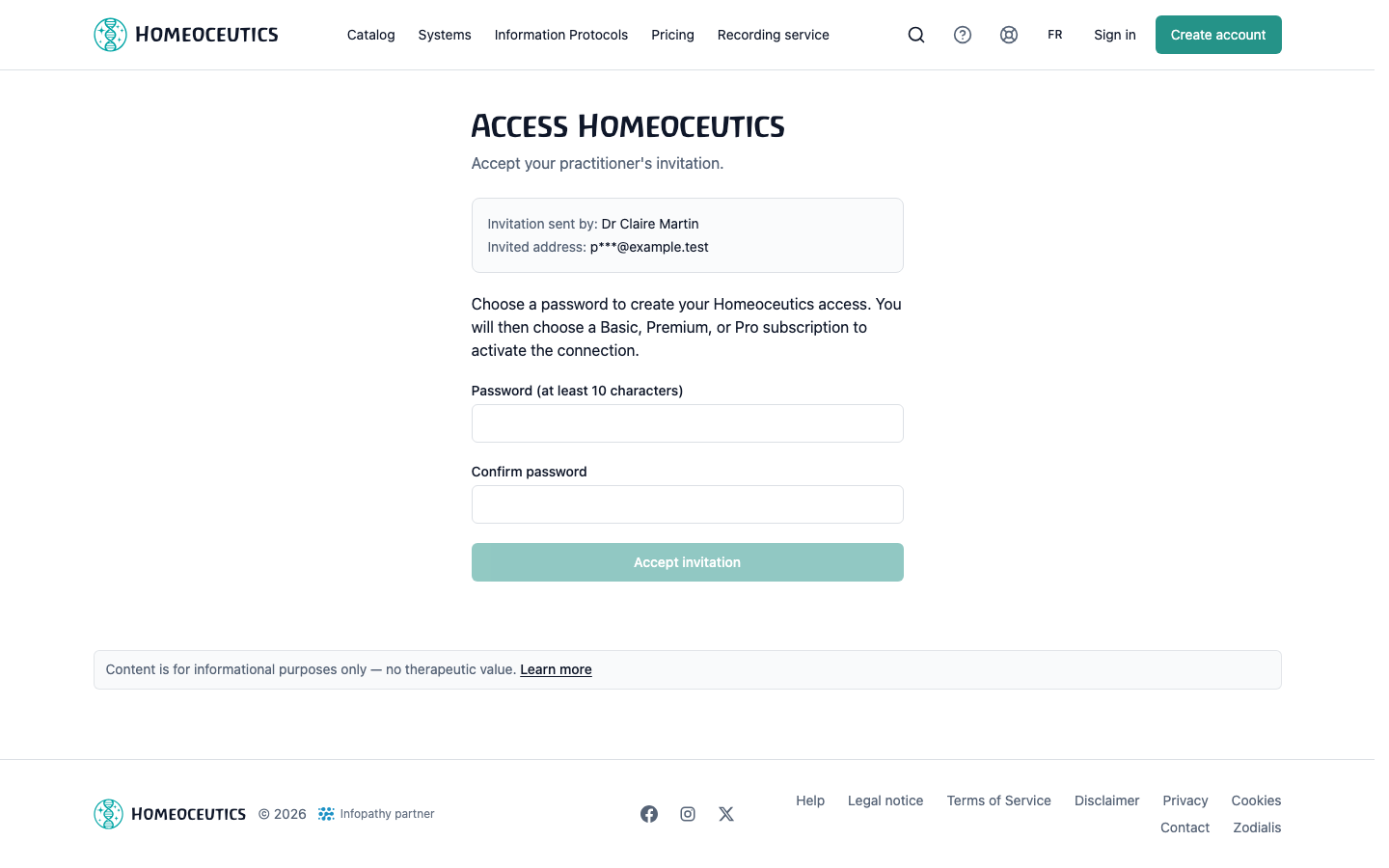
- The patient opens the link, signs in to an existing account or creates and verifies a new account.
- After acceptance, the patient account is linked exactly to the record held by the practitioner who issued the invitation.
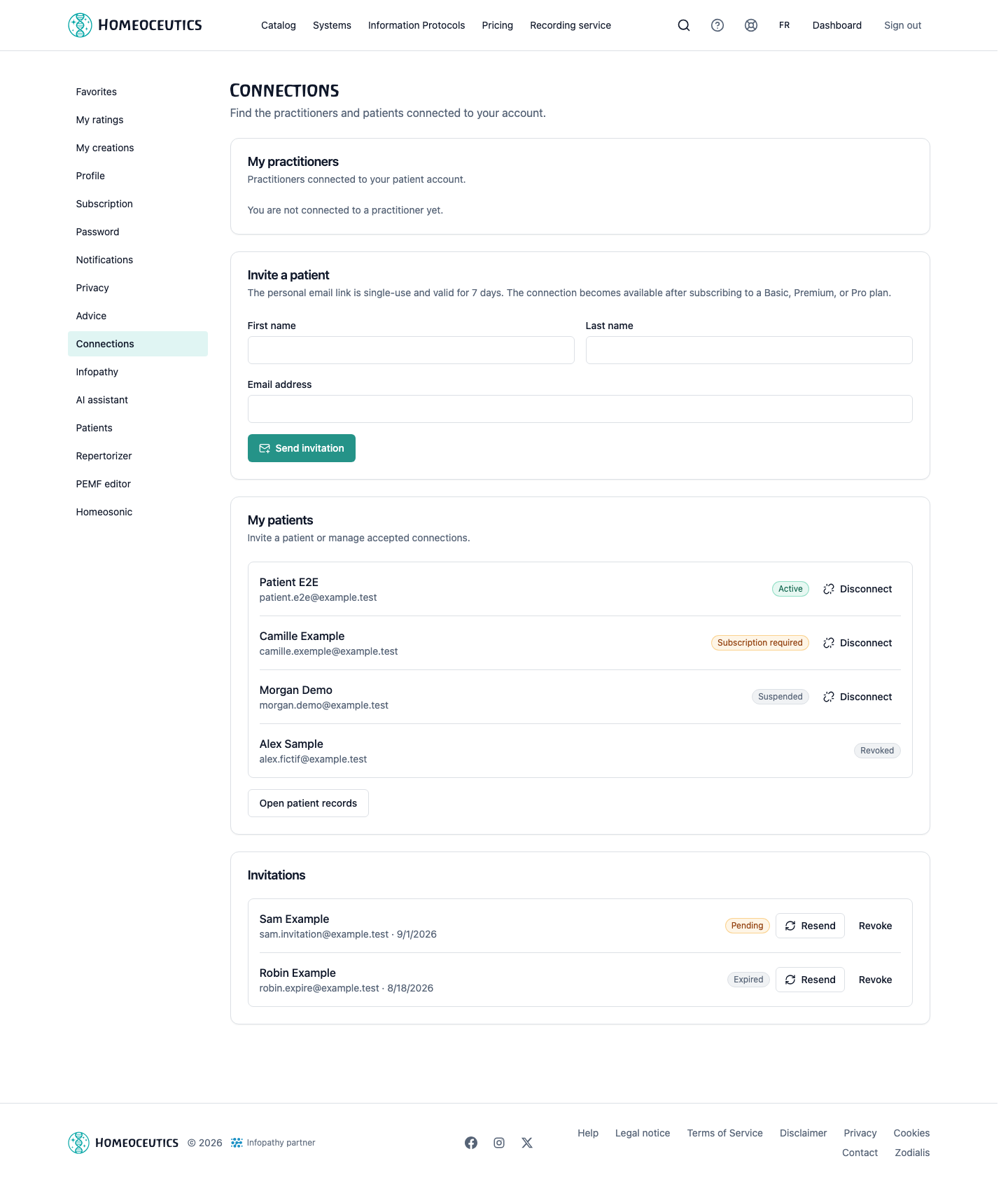
- If the patient has no subscription yet, the connection exists but remains unavailable until a Basic, Premium or Pro plan is activated.
- The practitioner can resend a pending invitation; the new link replaces the previous one and renews its validity.
- The practitioner can revoke a pending invitation. After acceptance, either party can disconnect from Connections.
- After a disconnection, the practitioner can send a new single-use invitation: accepting it reconnects the same account to the record without restoring advice that was previously revoked.
Tip
Confirm the email address with the patient before sending to avoid an unusable provisional record.
Caution
Disconnecting revokes active advice from that practitioner and removes its encrypted server payloads; it does not delete the practitioner-owned local record.
Images
Connections — invitation and states
- URL
- /help/en/liaison-praticien-patient.png
- Alternative text
- Fictional patient invitation and practitioner-patient connection states.
- Note
- Shows subscription-required, active, suspended and revoked states without a real address.
Patient invitation — accept or create the account
- URL
- /help/en/invitation-acceptation.png
- Alternative text
- Fictional practitioner-invitation acceptance page with patient account creation.
- Note
- The token, address and identity are demonstration data only.
Common issues
- If the link expired or was already used, ask the practitioner to resend the invitation.
- If the connection shows “subscription required”, activate or reactivate a subscription on the patient account.
- If the practitioner cannot invite, check the declaration, Pro subscription and any MFA check.
- If a connection is suspended, the local record remains stored but related advice is unavailable until eligibility returns.